

As we enter the final quarter of 2024, a powerful combination of AI technologies has emerged that promises to revolutionize marketing workflows: OpenAI’s o1 Reasoning model, complemented by documentation tools like Loom and Advanced Voice Mode. This innovative approach offers unprecedented opportunities for marketers to streamline their processes, boost productivity, and unlock new levels of strategic insight.
The AI Revolution in Marketing: o1 Reasoning Model and Process Documentation
OpenAI’s o1 Model: Your New Marketing Strategist
At the heart of this transformation is OpenAI’s o1 model, a quantum leap in artificial intelligence capabilities. Unlike its predecessors, o1 excels in complex reasoning tasks, making it the ideal tool for analyzing and optimizing marketing workflows. What sets o1 apart is its ability to “think before it answers,” producing long internal chains of thought before responding to queries.
For marketers, this means having an AI assistant that can not only process vast amounts of data but also provide strategic insights and creative solutions to marketing challenges. Imagine feeding your documented processes into o1 and receiving detailed, actionable suggestions for optimization and innovation.
Documenting Your Processes: Loom and Advanced Voice Mode
To fully leverage the power of o1, it’s crucial to have clear, detailed documentation of your marketing processes. This is where tools like Loom and Advanced Voice Mode come into play, offering flexible options for capturing your workflows.
Loom: Visual Documentation
- Loom is a powerful video messaging tool that allows you to visually record your marketing processes. It’s particularly useful for workflows that involve multiple steps, screen interactions, or visual elements. With Loom you can capture your entire workflow via screen recording, including mouse movements and clicks, providing a comprehensive visual guide.
Advanced Voice Mode: Audio Documentation
- For marketers who prefer audio documentation or need to capture ideas on the go, Advanced Voice Mode offers a hands-free alternative. With Open AI’s Advanced Voice Mode just speak naturally, and let the AI transcribe and structure your thoughts. Your spoken words are converted to text in real-time, creating instant documentation.
Transforming Workflows with o1 and Documentation
By combining the power of o1 with thorough process documentation, marketers can achieve unprecedented levels of workflow optimization. Here’s how it works:
- Document Your Processes: Use Loom to visually record your marketing workflows, or utilize Open AI’s Advanced Voice Mode to verbally describe your processes in detail.
- Feed Documentation to o1: Input your Loom video transcripts or Advanced Voice Mode audio transcriptions into the o1 model.
- Receive AI-Powered Insights: o1 analyzes your documented processes, applying its advanced reasoning capabilities to identify inefficiencies, suggest improvements, and even propose innovative new approaches.
- Implement and Iterate: Apply o1’s suggestions to your workflows, document the changes, and repeat the process, creating a cycle of continuous improvement.
This approach allows marketers to:
- Identify Hidden Inefficiencies: o1’s analytical capabilities can spot bottlenecks or redundancies that might not be apparent to the human eye.
- Develop Data-Driven Strategies: By analyzing your processes in the context of broader marketing data, o1 can suggest strategic shifts backed by solid reasoning.
- Automate Routine Tasks: o1 can identify opportunities for automation within your workflows, freeing up time for more creative and strategic work.
- Foster Innovation: The model’s ability to think outside the box can lead to novel solutions and approaches you might not have considered.
By leveraging the o1 Reasoning model in conjunction with thorough process documentation via Loom or Advanced Voice Mode, marketers can create a powerful feedback loop of continuous improvement and innovation. This AI-powered approach to workflow optimization has the potential to dramatically enhance productivity, creativity, and strategic thinking in marketing teams of all sizes.
The 4-Step AI Workflow Optimization Strategy
Now that we understand the power of these new AI tools let’s break down how you can integrate them into your marketing workflow to achieve maximum efficiency and creativity.
1. Document Your Process
The first step in optimizing your workflow is to thoroughly document your current processes. This is where tools like Loom and Advanced Voice Mode shine. Instead of spending hours writing out your procedures, you can simply record yourself going through your daily tasks.
Using Loom for visual documentation: Loom allows you to record your screen, camera, and microphone simultaneously. This is particularly useful for complex, multi-step processes that involve various tools and platforms. For example, when documenting your social media campaign creation process, you can record yourself navigating through your analytics platforms, content creation tools, and scheduling software, all while providing verbal explanations of your decision-making process.
To make the most of Loom:
- Start each recording with a clear introduction of what process you’re documenting
- Narrate your actions as you perform them, explaining the ‘why’ behind each step
- Highlight any pain points or areas where you feel the process could be improved
- End the recording with a summary of the key steps and any immediate ideas for optimization
Using Advanced Voice Mode for spoken documentation: For processes that don’t require visual demonstration, or for capturing ideas on the go, Advanced Voice Mode is invaluable. Its ability to understand context and nuance means you can speak naturally, as if explaining your process to a colleague.
Tips for effective use of Advanced Voice Mode:
- Begin by clearly stating the process or idea you’re documenting
- Speak in a conversational tone, allowing the AI to pick up on the nuances of your explanation
- Don’t hesitate to think out loud—the AI can help organize your thoughts later
- Ask questions or pose challenges to yourself as you go, which the AI can help address later
2. Generate AI-Ready Standard Operating Procedures (SOPs)
Once you’ve documented your processes, the next step is to convert these recordings into text-based Standard Operating Procedures (SOPs). This is where the integration of various AI tools can significantly streamline your workflow.
For Loom recordings:
- Use Loom’s built-in transcription feature to get a text version of your narration
- Employ tools like Zapier to automatically send your Loom transcriptions to a document creation tool like Google Docs
- Use AI writing assistants to clean up and format the transcription into a structured SOP
For Advanced Voice Mode recordings:
- Leverage the AI’s natural language processing to automatically structure your spoken thoughts into a coherent document
- Use voice commands to format the document as you speak, creating headings, bullet points, and sections
Regardless of the method you use, the goal is to create a clear, structured document that outlines your process step-by-step. This document will serve as the input for the o1 model in the next step of optimization.
3. AI-Powered Process Improvement
This is where the o1 model truly shines. By feeding your SOPs into o1, you can receive detailed, reasoned suggestions for optimizing your workflow. The key is to provide a clear, straightforward prompt that allows o1 to apply its advanced reasoning capabilities to your specific marketing processes.
Here’s an example of a suggested prompt for o1:
Analyze the following workflow. Suggest improvements and automation opportunities, focusing on efficiency,time-saving, and error reduction. Provide specific, actionable recommendations. For each suggestion,estimate the potential time saved per week.Workflow: [Insert SOP here]The o1 model will then provide a comprehensive analysis of your workflow, offering suggestions that you might not have considered. Its ability to think through multiple steps and consider various factors means it can provide insights that go beyond simple automation suggestions.
For example, o1 might suggest:
- Restructuring your content ideation process to incorporate AI-driven trend analysis
- Implementing a more sophisticated tagging system in your content management to improve searchability and reusability of assets
- Creating automated triggers that initiate certain parts of your workflow based on specific actions or time intervals
4. Implement Intelligent Automation
Armed with o1’s suggestions, the final step is to implement automations that will streamline your workflow. This is where tools like Zapier, Make, and even advanced features in platforms like Google Sheets come into play depending on the needs.
Key areas to focus on for automation:
- Data transfer between platforms: Eliminate manual copy-pasting by setting up automatic data flows
- Content distribution: Automate the process of publishing content across various channels
- Reporting and analytics: Set up automated reports that pull data from multiple sources into a single dashboard
Remember, the goal of automation is not to replace human creativity and strategic thinking, but to free up your time and mental energy for these higher-level tasks.
Real-World Applications and Productivity Gains
With the release of OpenAI’s o1 model, I wanted to put it thru its paces and was curious what I could do. So I test drove this myself. Here’s how I’ve created and optimized a process within my own business.
1. Content Creation Workflow Optimization
In my personal experience as a content creator and marketer, I’ve used this method to dramatically streamline my blog writing process as my first use case. I didn’t use Loom but just chatted with Advanced Voice mode. TBH, kind of shocked I had this many steps in my process. It really is an eye-opener. Here’s a breakdown of my current workflow before optimization:
Before AI Optimization:
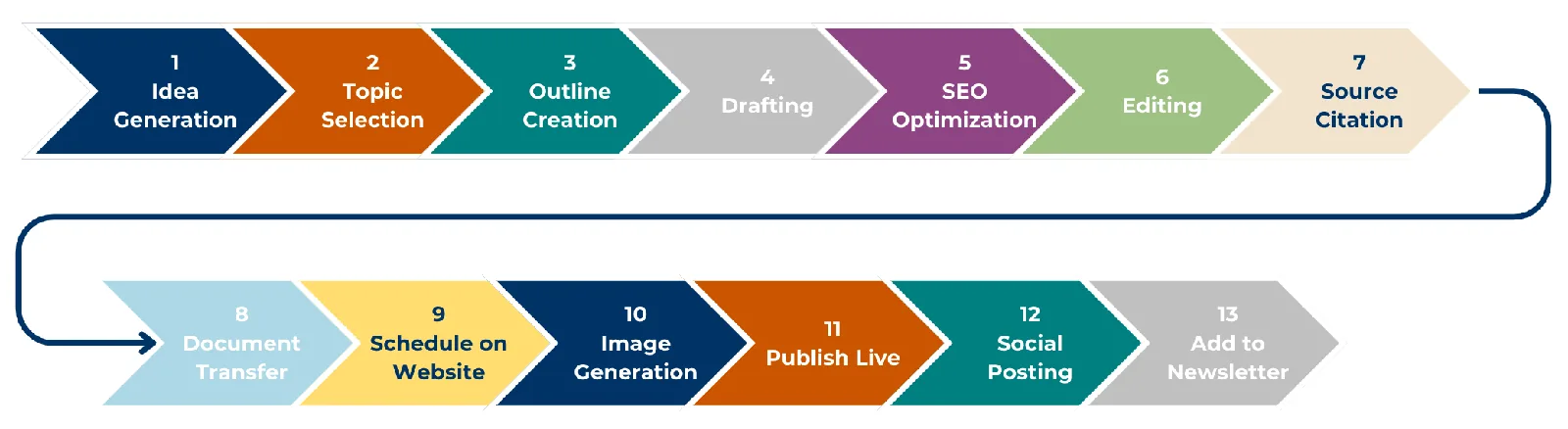 Current Pallas Advisory Blog Creation SOP
**Suggestions for Automation:**The o1 model took the above SOP essentially and provided me suggestions for the following improvements which I will be implementing. As much time as I can save on repeatable processes, the better. Over the next few weeks I’ll definitely be implementing these, I’m particularly surprised at the insights around SEO. I know I’ve not excelled in that area so this feedback is particularly helpful to me.
1. Content Creation: Outline and Drafting (Steps 3 & 4)
Why Focus Here?
- Time-Consuming: Developing outlines and drafting articles manually or even iterating with AI like Claude can be time-intensive.
- Repetitive Iterations: Multiple iterations with AI can slow down the process.
Productivity Gains Through Automation:
- Automated Workflows: Set up a system where your selected topic is automatically input into Claude or another AI writing assistant.
- Template Usage: Create standardized templates for outlines and drafts that the AI can fill in, reducing the need for multiple iterations.
- AI Enhancements: Use advanced AI tools that can learn from your past edits to produce drafts closer to your desired style on the first try.
Estimated Time Saved: Up to 50% of the time spent on content creation.
2. SEO Optimization (Step 5)
Why Focus Here?
- Detail-Oriented: SEO requires meticulous attention to keywords, meta tags, and readability scores.
- Specialized Knowledge: Staying updated with SEO best practices can be challenging.
Productivity Gains Through Automation:
- SEO Integration Tools: Use platforms like Surfer SEO or Frase that integrate directly with your content editor to provide real-time SEO recommendations.
- Keyword Automation: Automate keyword research and integration, allowing the tool to suggest and insert keywords seamlessly.
- Content Scoring: Automatically receive SEO scores and suggestions to optimize content without manual checks.
Estimated Time Saved: Up to 40% of the time spent on SEO tasks.
3. Content Transfer and Publishing (Steps 8 & 9)
Why Focus Here?
- Manual Effort: Copying, pasting, and formatting content between platforms is tedious.
- Error-Prone: Manual transfers can introduce formatting errors or omissions.
Productivity Gains Through Automation:
- Direct Integration: Use tools or plugins that allow you to publish directly from Google Docs to Squarespace.
- API Utilization: Leverage Squarespace’s API to automate content uploads, including images and formatting.
- Formatting Preservation: Ensure that the automation process preserves all formatting, reducing the need for manual adjustments.
Estimated Time Saved: Up to 30% of the time spent on transferring and formatting content.
4. Image Generation and Integration (Step 10)
Why Focus Here?
- Creative Bottleneck: Designing or selecting images can delay publishing.
- Consistency Issues: Manually ensuring images match content can be inconsistent.
Productivity Gains Through Automation:
- Automated Image Creation: Use Midjourney’s API to generate images based on your blog’s keywords or themes automatically.
- Auto-Integration: Set up a system where the generated image is automatically added to your blog post during the publishing process.
- Image Libraries: If custom images aren’t necessary, automate the selection of relevant images from stock libraries.
Estimated Time Saved: Up to 20% of the time spent on image-related tasks.
This optimized workflow will not only save a significant amount of time but also improve the quality and consistency of my content. By automating routine tasks, I was able to focus more on strategy and creative aspects of content creation.
The Mindset Shift: AI as Your Silent Partner
The key to truly revolutionizing your marketing workflow lies not just in the tools you use, but in the way you approach your daily tasks. Instead of viewing AI as a separate tool to be used occasionally, think of it as a silent partner that’s always there, ready to document, analyze, and optimize your work.
Here’s how to integrate this mindset into your daily routine:
-
Always-On Documentation
- Keep Loom or Advanced Voice Mode running in the background as you work
- Get in the habit of narrating your thought process as you perform tasks
- Use voice commands to flag important moments or ideas for later review
-
Continuous Improvement
- Regularly review the AI-generated documentation of your processes
- Use o1 to analyze your workflows on a weekly or monthly basis
- Implement small optimizations continuously rather than waiting for big overhauls
-
Embrace Experimentation
- Use AI to generate multiple approaches to a task or problem
- Test different workflows and let AI analyze the results
- Be open to unconventional solutions suggested by AI
-
Collaborative AI
- Share your AI-documented processes with team members
- Use AI to facilitate knowledge transfer and training
- Encourage team-wide adoption of AI tools for consistent optimization
By adopting this mindset, you’re not just using AI tools—you’re creating an AI-enhanced work environment that continuously evolves and improves. This approach can lead to exponential productivity gains over time, as each small optimization compounds upon the last.
Conclusion: Embracing the AI-Powered Future of Marketing
The integration of AI tools like OpenAI’s o1 model and Advanced Voice Mode isn’t just an option—it’s a necessity for those who wish to stay competitive. The landscape of marketing is evolving at an unprecedented pace, and these AI innovations offer us the ability to not just keep up, but to lead the charge.
By adopting the four-step AI Workflow Optimization Strategy outlined in this article, marketers can:
- Document processes with unprecedented ease and detail
- Generate comprehensive, AI-ready Standard Operating Procedures
- Leverage advanced AI models for insightful process improvements
- Implement intelligent automations that dramatically boost productivity
The real-world applications of AI in marketing showcase significant benefits, such as time savings and improved campaign performance. The true potential of AI lies in the mindset shift it encourages, enabling marketers to view AI as a collaborative partner that enhances creativity and strategic thinking. As the AI revolution in marketing is already underway, marketers who effectively integrate AI into their workflows will thrive. Embracing continuous optimization and adaptability is crucial for success. Start documenting processes, experimenting with AI tools, and prepare to lead the future of marketing.